- 3.5Inch
- Discussion
- Content

NyViRiX 
0 where you have select background on the main page of the app should be an option to use installed videos that are on the devices like the 5 inch ips panel1 months ago

NyViRiX 
0 would like to see the vram working for the 9070xt, wouldn also like to see the ability to add gifs, mp4, video files in the theme editor1 months ago

Shariken31 
0 merhaba 3.5 inc cihazı için yazıyorum gif koyma özelligi varmı acaba yada başka bi driver ı varmı2 months ago

Smekta 
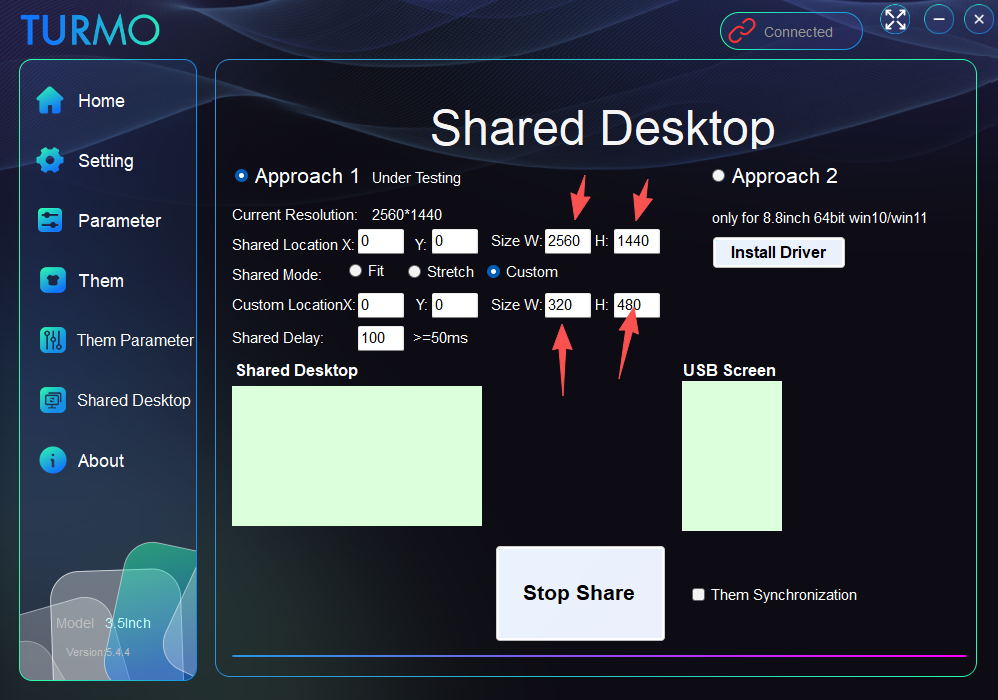
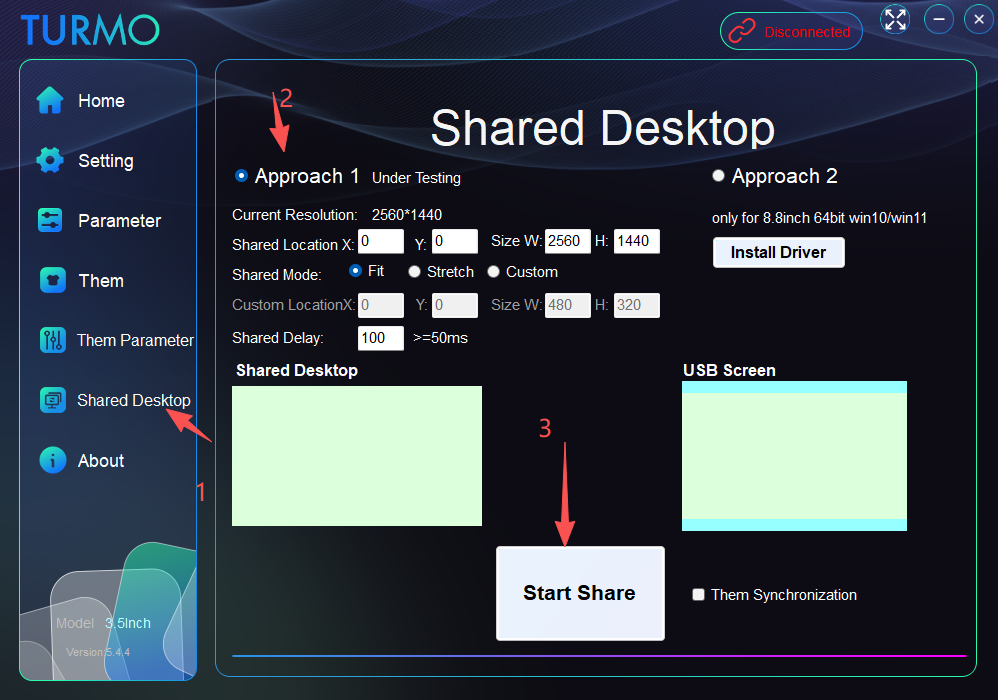
0 Hi, it would be awesome if i could select my second screen for the shared desktop !! Thank you2 months ago

turmo
AuthorSection Creator0 Hello! I don't quite understand what you mean. Could you share some pictures for reference? Do you currently have two large monitors connected to your computer, and need to use this software on the other one? You can just drag the window over there directly.2 months ago@Smekta

turmo
AuthorSection Creator0
Hello! You need to set this resolution to match the one on your right so it can fully cover the screen. For this landscape‑oriented screen, you should select a landscape‑themed preset to enable landscape mode. You’re currently using portrait mode. Thank you!2 months ago@turmo
Smekta 
0
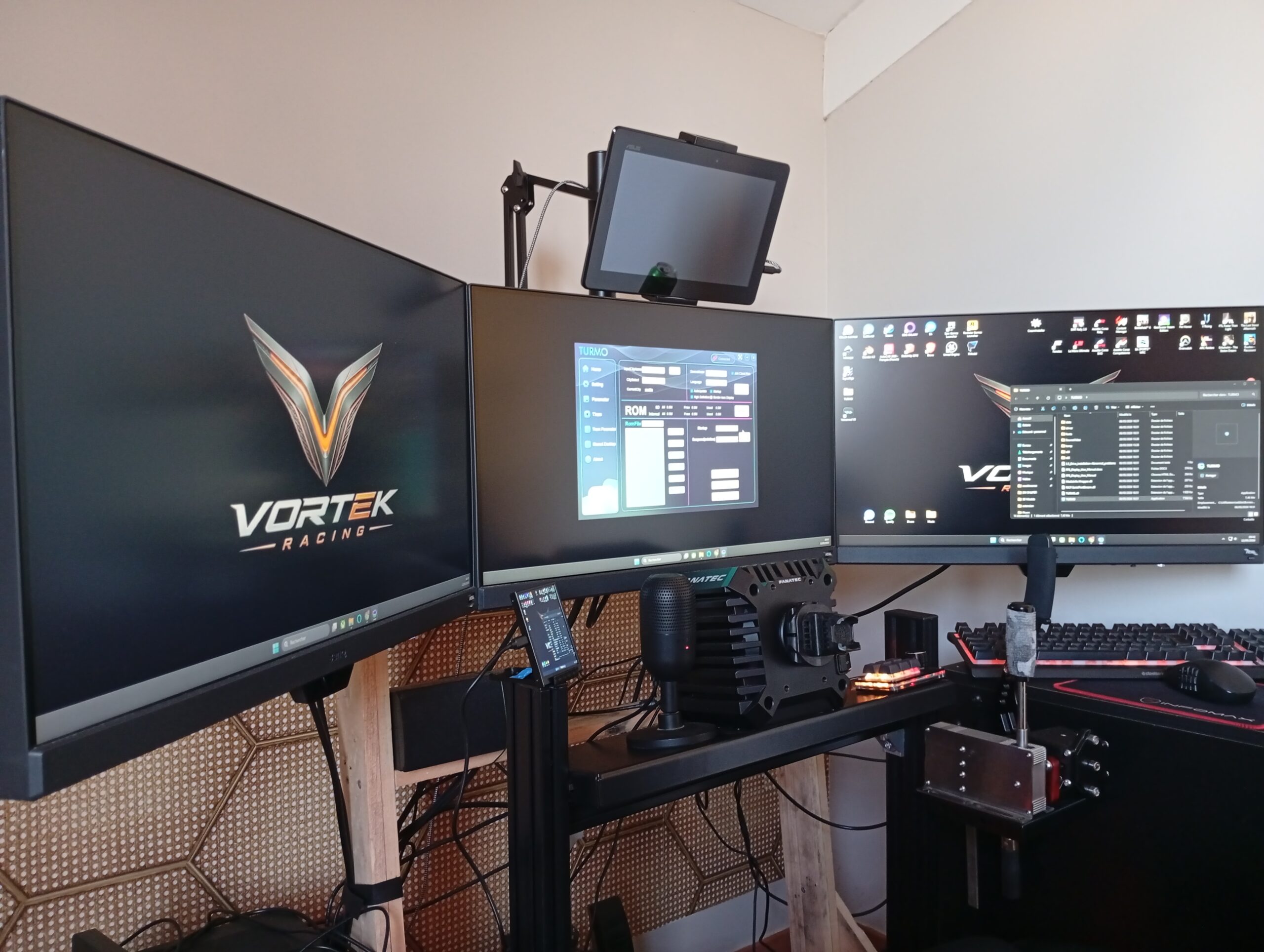
Hello, I can only share parts of the main screen on the right. I would like to share parts of an other screen on my Turmo. Thank you for answering. I'm sorry if I don't explain it well 🙂 (Yes, I love screens, and yours is really cool !!)2 months ago@turmo

turmo
AuthorSection Creator0 Hello! Please refer to this image. However, due to limitations of USB hardware speed, the refresh rate is quite slow! You may also adjust the partial sharing position via the data cable yourself. This is only for testing purposes. Thank you!
2 months ago@Smekta

Smekta 
0 Thank you for the reply. It works well. But I can't chose my SECOND screen :). That would be great. It only work with the main display. Or may be just disable the "out of screen" restrictions, because I use an extended desktop on 2 screens2 months ago@turmo

JesusLuvsU2 
0 I am a little confused on how to set up my own themes, or if there is a way to download new themes. Is it possible to use animated backgrounds or a video as our background?2 months ago

turmo
AuthorSection Creator0 Hello! Please refer to this link https://turmo.org/?p=222 for theme production! If the downloaded theme needs decompression, please unzip it first to get the file with the suffix .turmo, then place it in the date subfolder under the software directory.After copying the files, you must restart the application. Thank you!2 months ago@JesusLuvsU2

rodrigogrise 
0 nice4 months ago

Rock 
0 So for me the ram amount shows wrong always, no method to change it, my gpu shows 5070 instead of 5070ti. honestly id prefer that the software identifies our default hardware or link it with occt software or aida software. and please bring out more themes i would really appreciate. thank you for your customer service till now i really appreciate it
5 months ago

turmo
AuthorSection Creator0 Regarding the issue where the displayed memory size does not match the actual model, have you tested version 5.4.3? We will continue to look into it. Thank you!4 months ago@Rock

Rock 
0 yep i have tested the latest version still no change but now ive switched to just stats without displaying any component name so its fine thanks3 months ago@turmo

turmo
AuthorSection Creator0 Hello! When you mentioned the RAM capacity display issue, were you referring to the capacity shown under the memory model? By the way, the graphics card model can now be displayed in full!4 months ago@Rock

Rock 
0 yes, the capacity shows 32gb but i have 64gb thanks for the help!4 months ago@turmo

ugsAreBad 
0 I think it would be good if the 180 rotation is saved on startup so if I reboot the PC the 180 rotation is saved5 months ago

turmo
AuthorSection Creator1 Hello! Before rotating 180 degrees, please stop the theme first. After modifying it to 180 degrees, run it again, and the theme will be saved. Thank you.4 months ago@ugsAreBad

xdominhd 
0 In next update you could add RAM temperature sensor reading,5 months ago

turmo
AuthorSection Creator0 Hello! Does the memory module come with a temperature sensor?4 months ago@xdominhd

xdominhd 
0 Yes i can see my ddr5 temps4 months ago@turmo

thiartj 
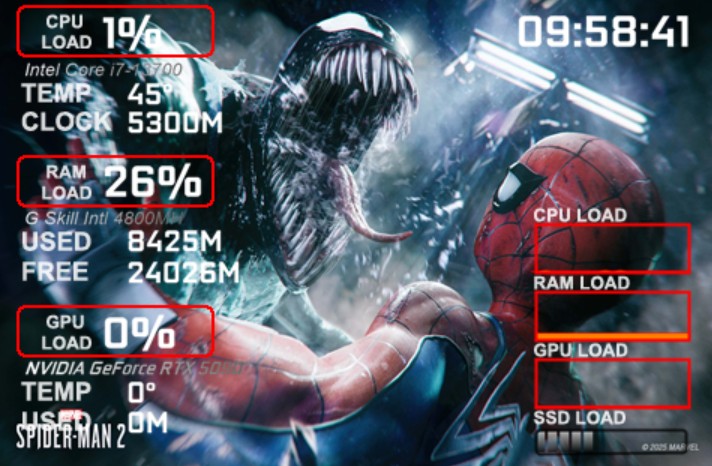
0 Update on Below!!. After PC reboot and Sensor Service enabled in Windows the problem weems to be sorted Please check software for RTX Nvidia 50 Series. GPU Load and Temp en Memory Usage is not detected correctly. Please see attached image
5 months ago

turmo
AuthorSection Creator0 Hello! The relevant parameters have been set in the them parameter section, and they are likely applied to the iGPU parameters. Thank you.4 months ago@thiartj

MelvinP07 
0 Hello, due to the high demand for the mini screen in different sizes because of online sales, it would be great if you could add Spanish to the software in future updates.5 months ago

turmo
AuthorSection Creator0 Sure! Your proposal has been accepted and will be adopted.4 months ago@MelvinP07

KukiGraph 
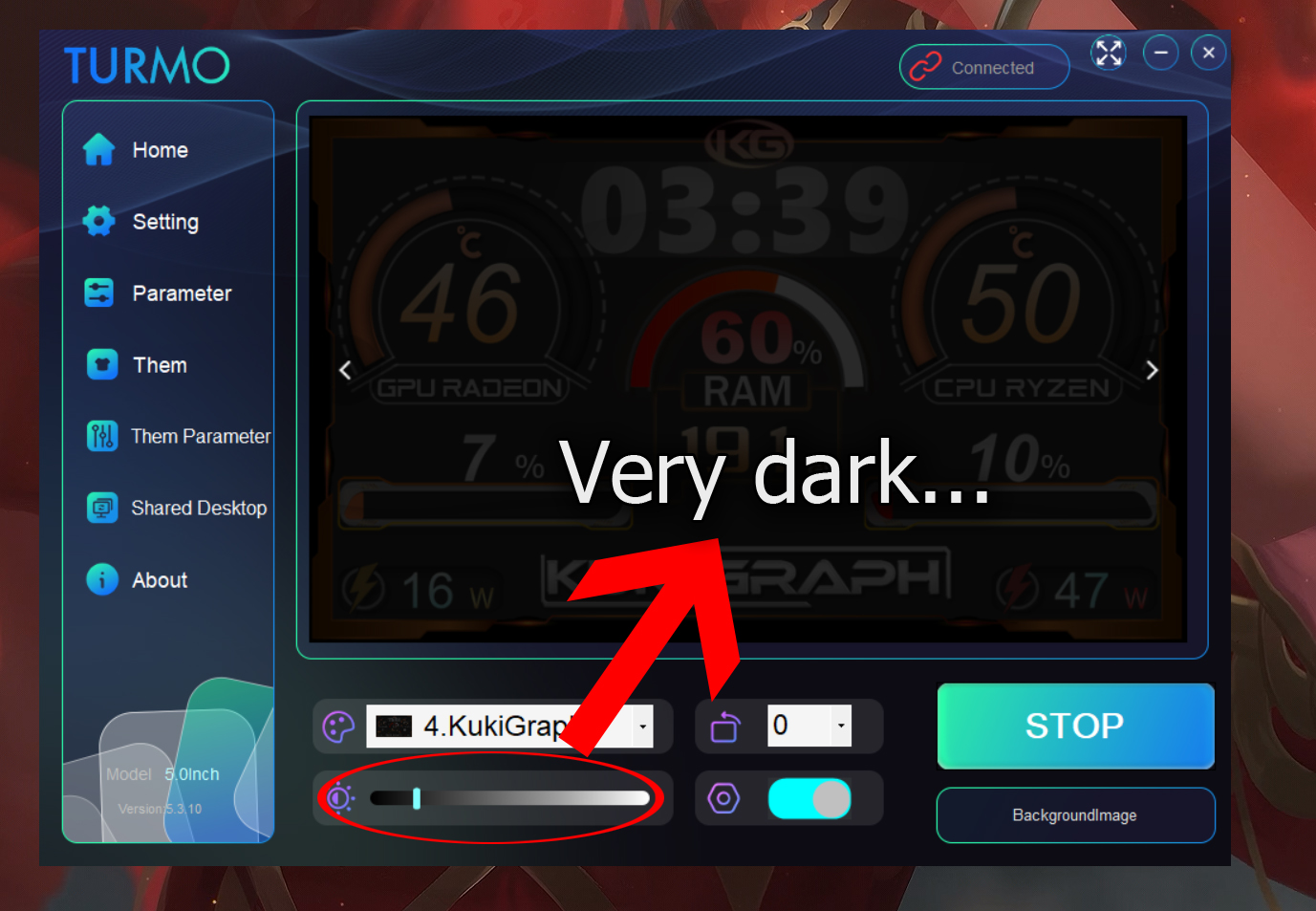
1 I don't like the brightness bar. I understand that it's to control the brightness of the USB screen, but I don't see much point in the floating version of the panel also darkening. I'd like to have it duplicated on an 8-inch HDMI monitor that I have and on the default 5-inch USB screen, but with the brightness set to half, the other one looks ugly. It's as if it had a black layer or a black filter over it. I hope you can fix this.
5 months ago

turmo
AuthorSection Creator0 Hi! You can stop the operation first, turn the brightness to the maximum, then start running again—the settings will be saved automatically. Some HD monitors require this brightness adjustment function!5 months ago@KukiGraph

Tier 
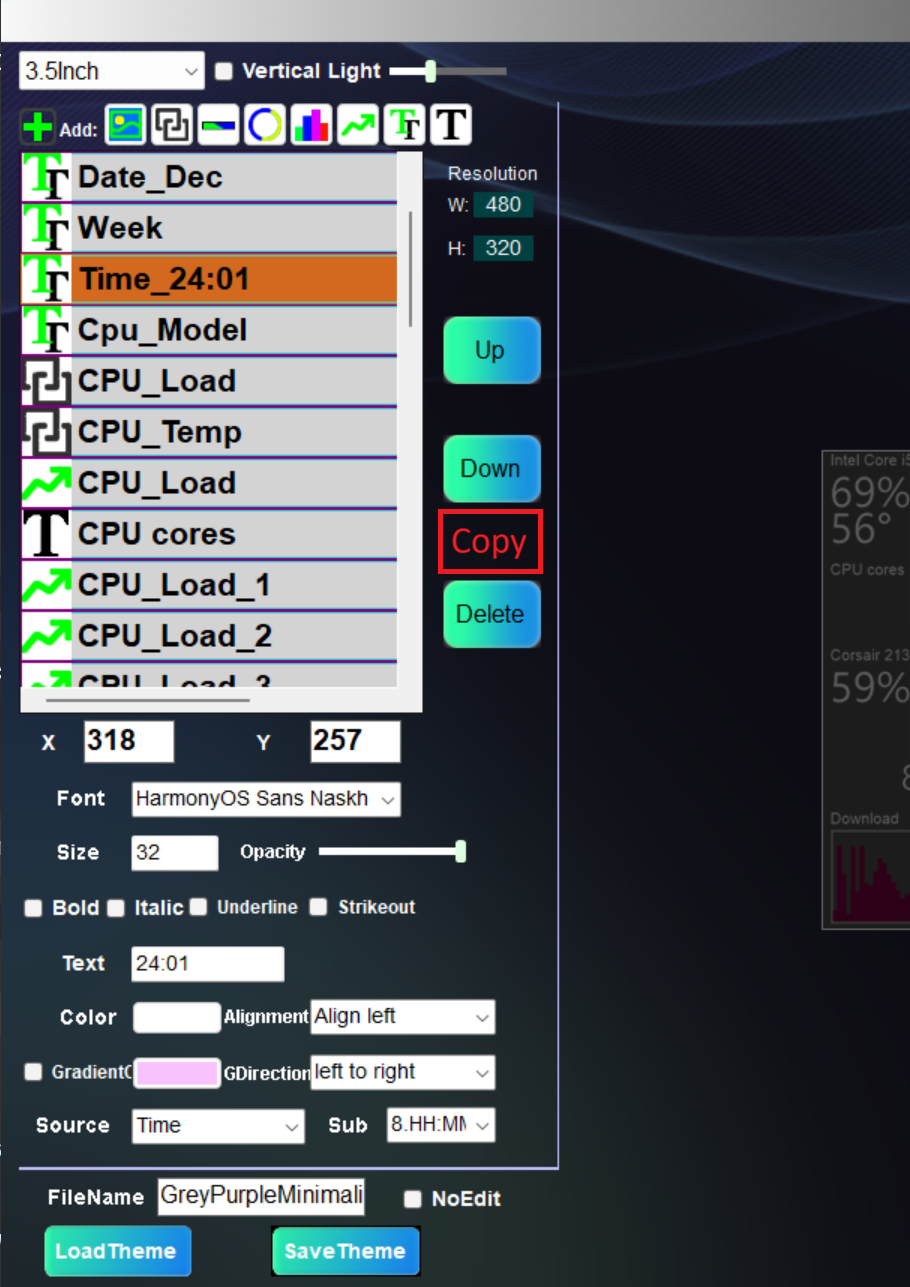
1 Would be nice to have "Copy" button in Theme Editor. Case: I want to create 10-15 similar elements on the screen.
5 months ago

turmo
AuthorSection Creator0 That's a great idea! Thank you!5 months ago@Tier

Shaharul Hossain 
0 I tried it today for the first time. App closes automatically. It doesn't work for me. The device screen is white, with nothing on it.5 months ago

turmo
AuthorSection Creator0 Hello! Please try the latest version 5.3.10. Thank you!5 months ago@Shaharul Hossain

turmo
AuthorSection Creator0 Hello, please delete the config.at file in the date folder under the software directory, then delete all files in the fonts folder. Restart the application and this issue should be resolved.5 months ago@Shaharul Hossain

Daniel Baumgart 
0 love the software and pretty simple setup. The fps counter seems not to work and it says Hz, maybe make it so u can deside if it says something or nothing.6 months ago

turmo
AuthorSection Creator0 Hello! The FPS function based on RTSS has been added. Please download the update; the tutorial is included in the package. Thank you!5 months ago@Daniel Baumgart

Tier 
0 I would like to double this. FPS doesn't works for me. GPU frame rate feature would be nice to have!5 months ago@Daniel Baumgart

turmo
AuthorSection Creator0 Hello! The FPS function based on RTSS has been added. Please download the update; the tutorial is included in the package. Thank you!5 months ago@Tier

turmo
AuthorSection Creator0 Hello! I’m working on fixing this FPS feature at the moment. Could I just confirm with you—when you talk about FPS, do you mean the GPU frame rate, the monitor refresh rate, or FPS in another context?6 months ago@Daniel Baumgart

Daniel Baumgart 
0 I was hopeing it would show the framerate in the game iam playing 😀6 months ago@turmo

foo5764 
0 preferred use GPU frame rate especially RTX card or Radeon card6 months ago@turmo
Answer40
Author onlyLatestHot


Hello! You need to set this resolution to match the one on your right so it can fully cover the screen. For this landscape‑oriented screen, you should select a landscape‑themed preset to enable landscape mode. You’re currently using portrait mode. Thank you!
Hello, I can only share parts of the main screen on the right. I would like to share parts of an other screen on my Turmo. Thank you for answering. I'm sorry if I don't explain it well 🙂 (Yes, I love screens, and yours is really cool !!)
![Emoji[qiang]-TURMO](http://turmo.org/wp-content/themes/zibll/img/smilies/qiang.gif)