

- 3.5Inch
- Discussion
- Content

turmo
AuthorSection Creator0 I will ask our designer to review the file tomorrow.3 hours ago@3.5incher

turmo
AuthorSection Creator1 Hello, the crash is caused by index out-of-range errors in your custom theme project file The default themes work normally because their data structure is complete, while your personalized project has missing configuration items or incorrect index values in the configuration list. You can package and send me your project engineering file, and I will help you check the wrong fields and index parameters inside the file one by one to locate the exact error point.4 hours ago@3.5incher

turmo
AuthorSection Creator0 hello, still under R&D
3 days ago@alper

turmo
AuthorSection Creator0 https://turmo.org/?post_type=forum_post&p=441 Hello! Please check this link! Also note that before plugging in the USB, make sure all non-Turmo software is fully closed so the USB won't be detected by other programs.
3 days ago@PredaRobert

turmo
AuthorSection Creator0
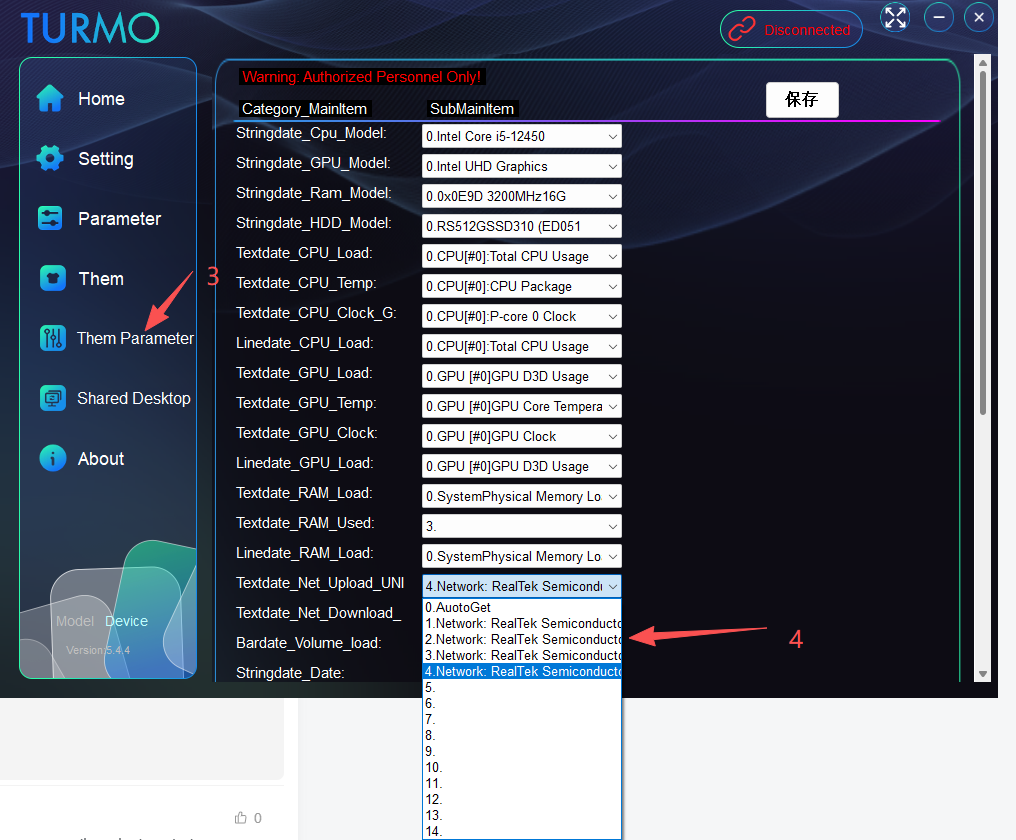
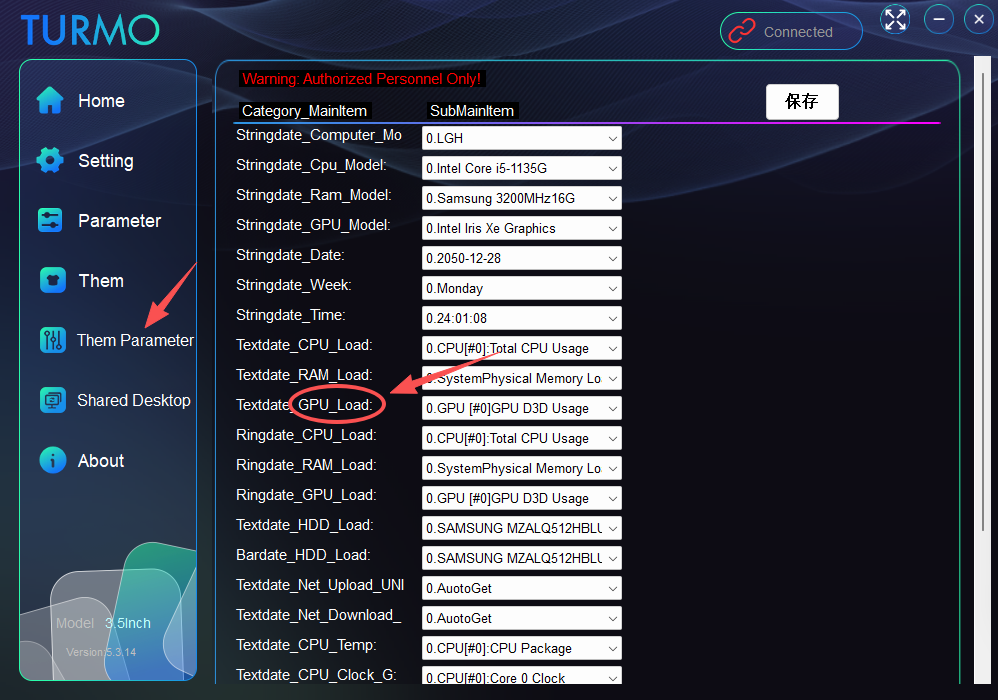
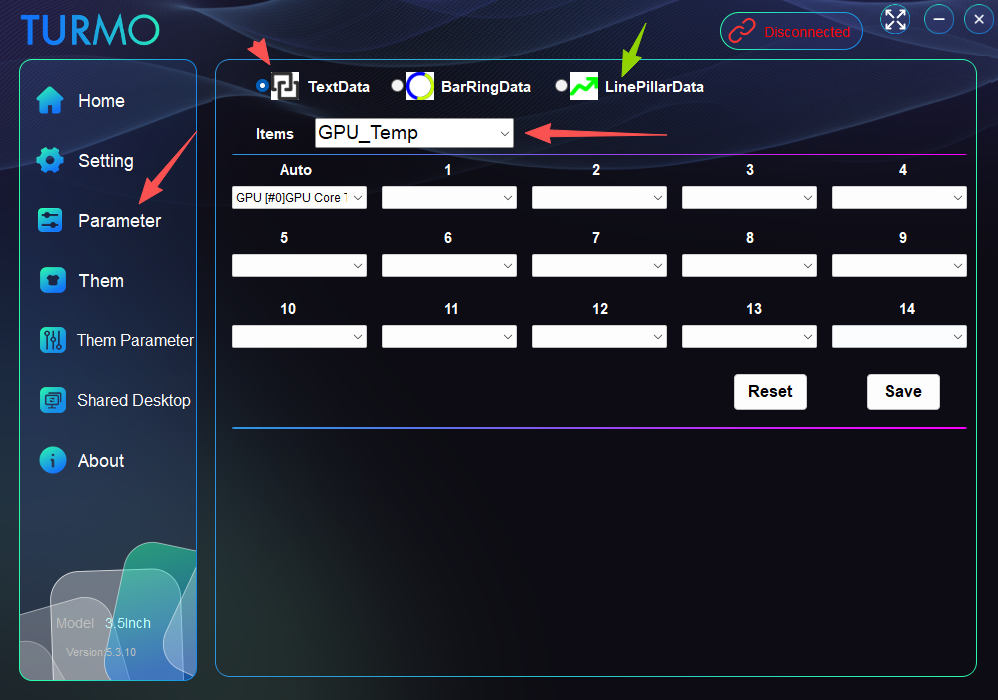
Hello! You can configure GPU parameter command selections here.13 days ago@kjcgooner

turmo
AuthorSection Creator0 The outer package appears intact on the surface. However, due to constant squeezing, bumping and heavy stacking during long-distance international shipping, subtle impacts are generated. These impacts won’t cause any visible damage to the outer carton, yet may loosen or damage the internal parts of your item. We sincerely apologize for the bad experience caused by these transit issues.1 months ago@v1ru5

turmo
AuthorSection Creator0 Hi there! I can see it here. This damage must have occurred during transit.1 months ago@v1ru5

turmo
AuthorSection Creator0 Hi there, I would like to confirm one point: Will the monitor show a solid pure white full-screen image right after startup? If yes, please provide me with corresponding pictures of the fully white screen for reference.1 months ago@v1ru5

turmo
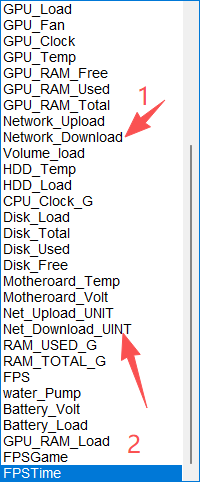
AuthorSection Creator0 Hello. There are two options in the network settings: The first one uses MB/s as the unit. If your network speed fails to reach 1000 KB/s, it may keep displaying 0. The second option features an auto-switching unit, and you must select the name of your currently active network adapter for this option!
1 months ago@Patyek

turmo
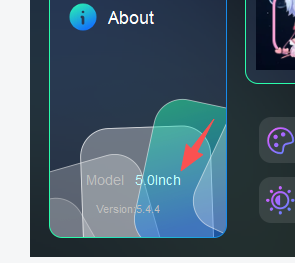
AuthorSection Creator0 If your model is the 5inch version, you need to download the main program file from here. Thank you. https://turmo.org/?post_type=forum_post&p=299
1 months ago@zafzaf

turmo
AuthorSection Creator0 If your model is the 5inch version, you need to download the main program file from here. Thank you. https://turmo.org/?post_type=forum_post&p=299
1 months ago@BRUNO070898

turmo
AuthorSection Creator0 hello,visit this link https://turmo.org/?post_type=forum_post&p=299 thank you1 months ago@Dgnn

turmo
AuthorSection Creator0 hello,Due to USB low-speed transmission mode, this model currently does not support video mode and GIF mode, as both transmission speed and hardware specifications cannot meet the requirements.2 months ago@JesusLuvsU2

turmo
AuthorSection Creator1 Hello! Please refer to this link https://turmo.org/?post_type=forum_post&p=495 ! Make sure FPS is always running in the background via RTSS, and keep the game displayed on the main interface. If it doesn't work, RTSS may fail to inject related programs into the game, which could be caused by enabled memory protection mechanisms or other issues.2 months ago@JesusLuvsU2

turmo
AuthorSection Creator0
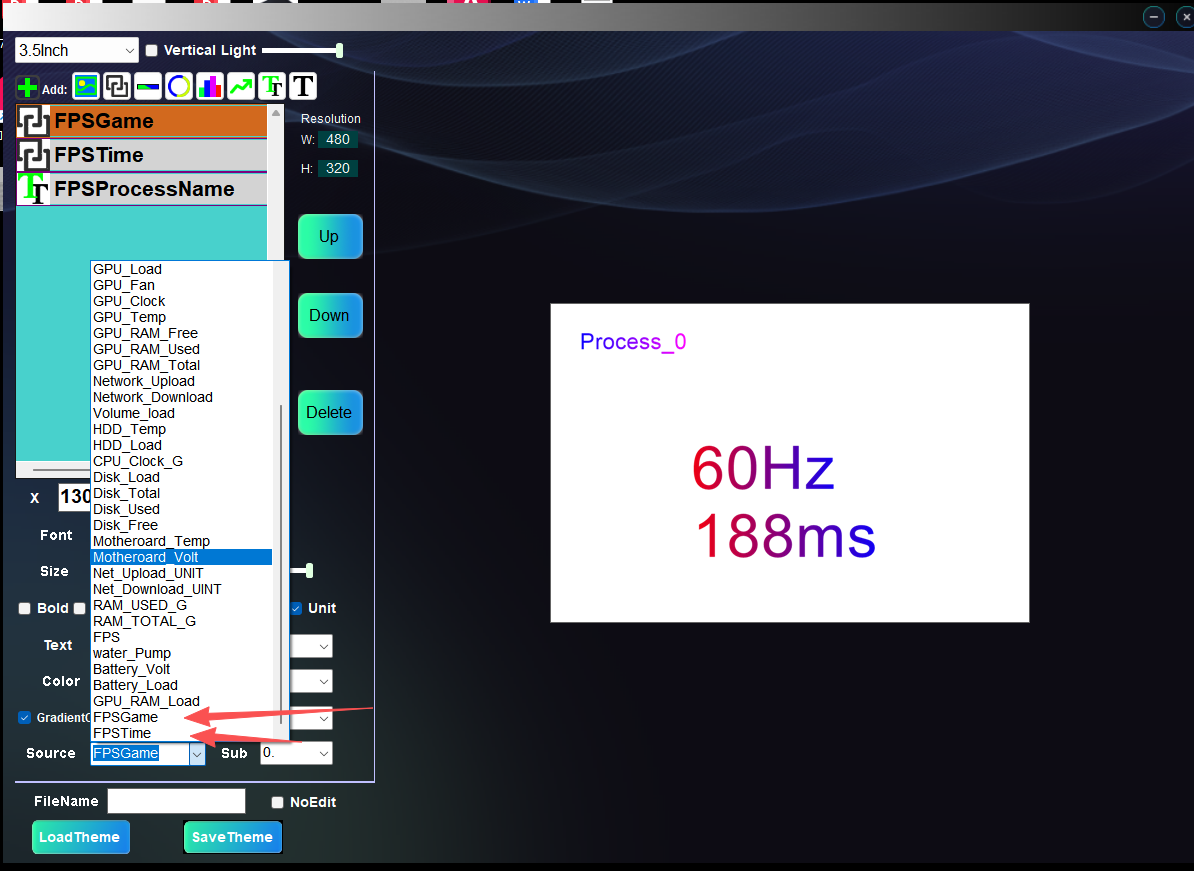
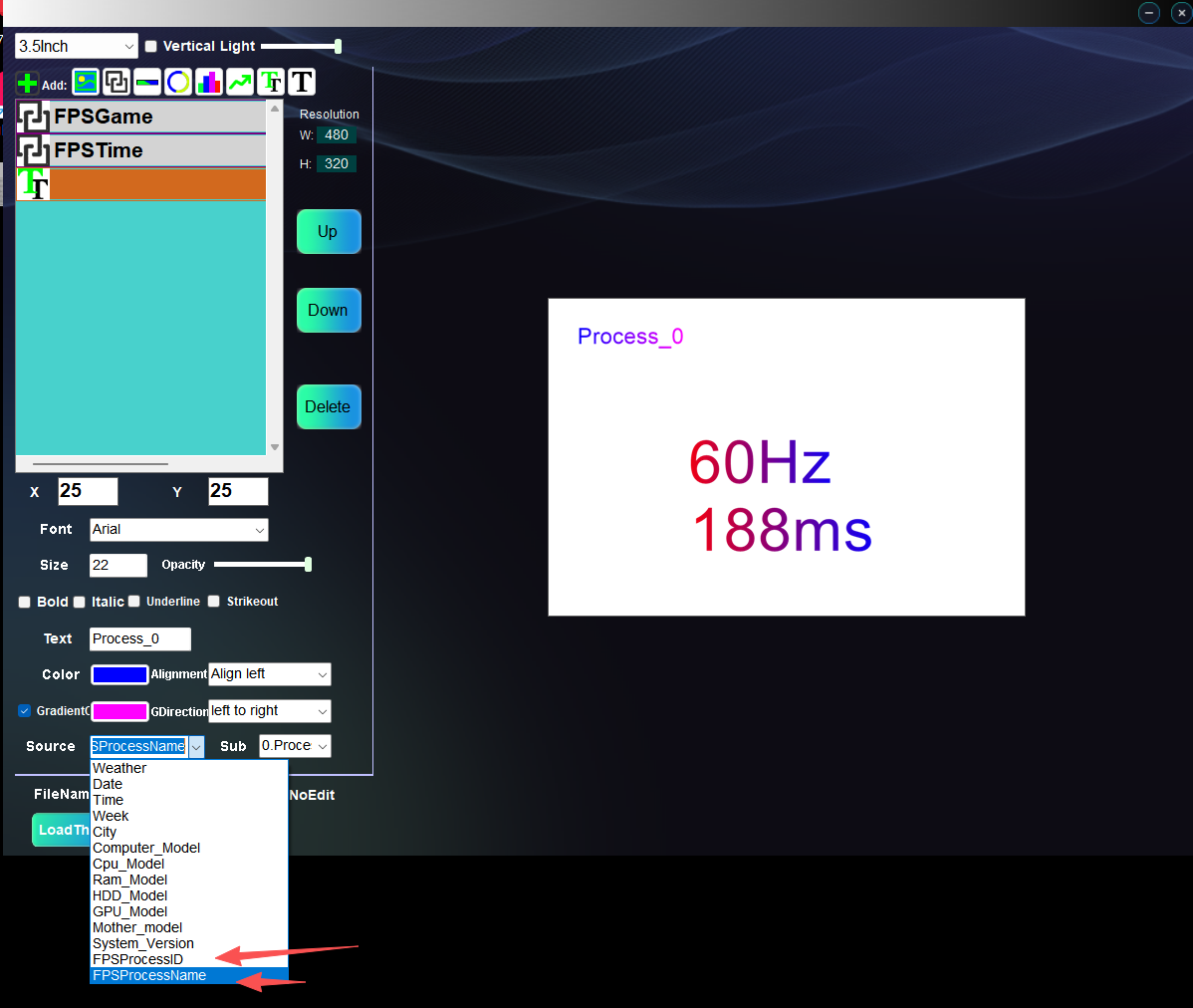
Hello! The FPS function now displays the real-time process name, process ID, frame rate value, and frame time. Data will only be shown when a game is running. Thank you.3 months ago@xdominhd

turmo
AuthorSection Creator0 The FPS function only shows the frame rate when a game is running.3 months ago@xdominhd

turmo
AuthorSection Creator0 Hello! For versions 5.4 and above, there is an installation tutorial in the RTSS installation directory, and the FPS function will work properly all the time! Thank you3 months ago@xdominhd

turmo
AuthorSection Creator0 Hello! Please delete the following files under the date folder in the 5.4.4 directory: config.at, PBSouce.json, PPLine.json, PTSouce.json. Give it a try and let me know how it goes! Thank you.3 months ago@Ogima

turmo
AuthorSection Creator0 Hello! Please test with the latest version 5.4.3, minor changes have been made. The FPS feature has been working properly all along!
4 months ago@xdominhd

turmo
AuthorSection Creator1 hello,5.3.16 --Resolved the volume difference discrepancy problem THX4 months ago@johnyboy

turmo
AuthorSection Creator0 Version 5.3.14 uses a new audio interface, which is compatible with more audio signals!5 months ago@johnyboy

turmo
AuthorSection Creator0 Hello, could you please tell me your computer system model, system bit version (32-bit or 64-bit), and system language?5 months ago@Cypher441

turmo
AuthorSection Creator0 Hello, I will pass the information along. Thank you! There shouldn’t be a temperature sensor on the RAM, should there?5 months ago@foo5764

turmo
AuthorSection Creator0 https://turmo.org/?post_type=forum_post&p=441
5 months ago@Link Koriri

turmo
AuthorSection Creator0 Hello! Rendering images takes time, especially when there are many parameters being updated, which requires even more time.5 months ago@rwmaios80

turmo
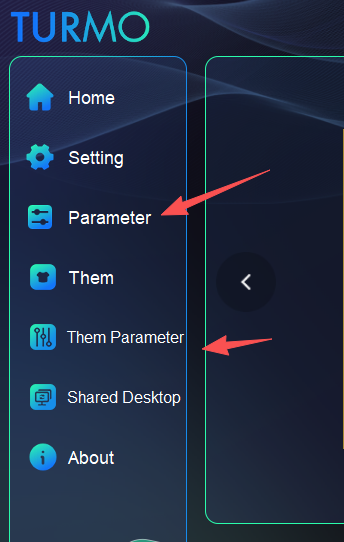
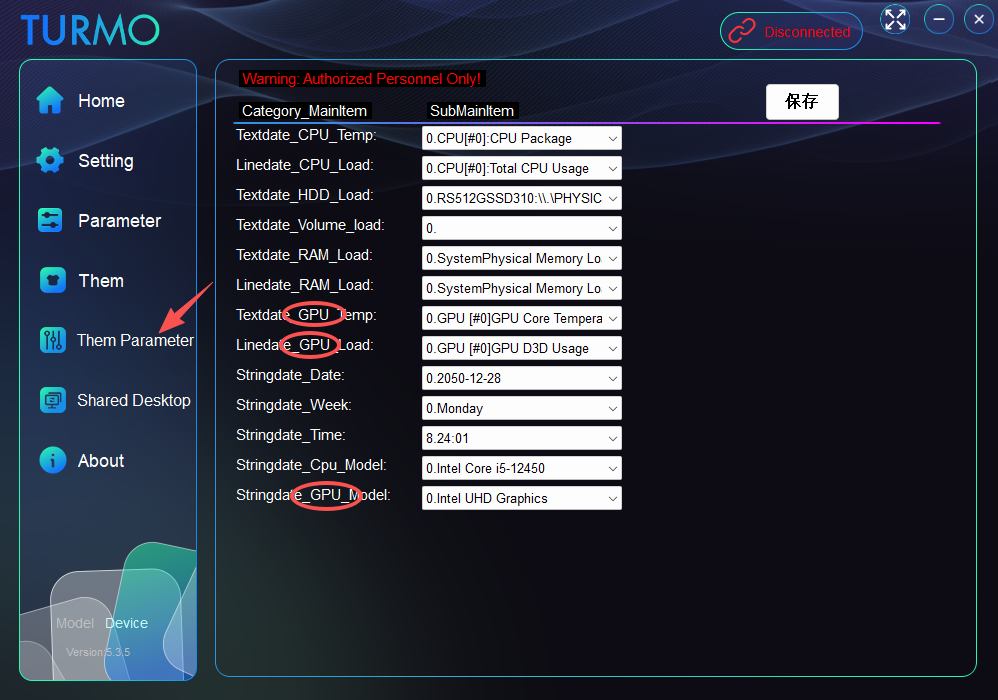
AuthorSection Creator0 You can click on "theme parameter" to adjust the current theme parameters for GPU load, or use "parameter" to change all basic default settings.
5 months ago@Montu


turmo
AuthorSection Creator2 Hello! The FPS function based on RTSS has been added. Please download the update; the tutorial is included in the package. Thank you!5 months ago@CERIM

turmo
AuthorSection Creator1 Hello! Issues related to FPS and other related problems will be resolved in the coming weeks. Thank you!5 months ago@CERIM

turmo
AuthorSection Creator0 Hello! Are you referring to the total memory size shown in the text? Please check if the parameters related to them parameter have been set to use virtual memory.5 months ago@Baltazar2009PL

turmo
AuthorSection Creator0
Hello! If you're updating by overwriting files with the latest version, please follow these steps:
1. Close the application in the background.
2. Delete the config folder inside the software's data directory.
3. Restart the application.5 months ago@Baltazar2009PL

turmo
AuthorSection Creator0 Hello! Version 5.3.11 is now available!
5 months ago@Dartaroth

turmo
AuthorSection Creator0 Hello! Could you let me know which version you require, and which specific parameters are problematic?5 months ago@johnyboy

turmo
AuthorSection Creator1 Hi there! You can now go to the "parameter" section to modify the 15 required parameters for the "theme parameter" configuration.
5 months ago@Rhylock

turmo
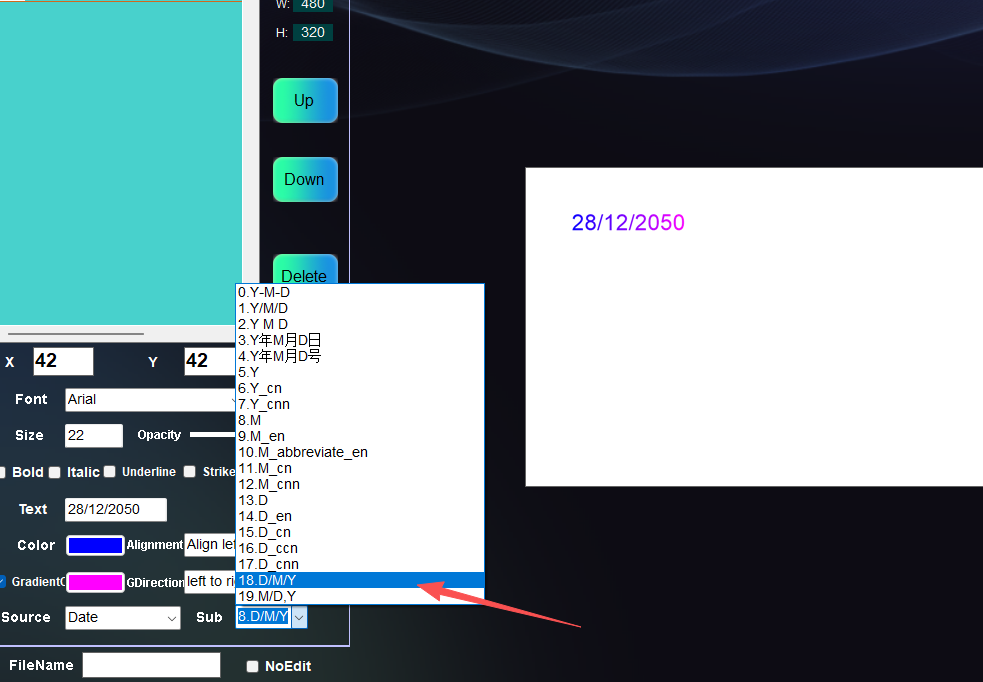
AuthorSection Creator0
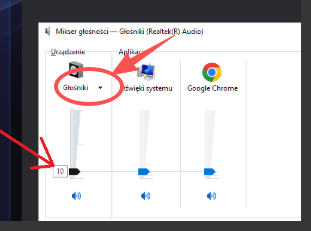
Hello! You can try checking here – it should be outputting to the wrong device by default, as there are usually multiple audio output devices on a computer. We'll arrange for the technical team to fix this issue in the follow-up!5 months ago@xdominhd

turmo
AuthorSection Creator0 Hello! The default audio volume should be for the speakers. You can check the audio mixer settings for this. We will fix this bug in a subsequent update! Thank you!5 months ago@xdominhd

turmo
AuthorSection Creator0 Hello! The information has been forwarded to the technical team. Thank you!5 months ago@xdominhd

turmo
AuthorSection Creator0 Hello! You can try the following steps: 1. Close the app from the background 2. Delete the config.at file in the app folder 3. Restart the app 4. Check if the issue still exists 5. If it no longer appears, modify the parameters containing “GPU” via “Them Parameter”! Thank you!5 months ago@xdominhd

turmo
AuthorSection Creator1 This issue has been fixed in version 5.3.10 – feel free to test it out! The system will not retrieve any data (e.g., C drive info) as long as the theme does not require it. Thank you!5 months ago@kipo

turmo
AuthorSection Creator1 Hi! We'll fix this later, and no hard drive info will be used or accessed.5 months ago@kipo

turmo
AuthorSection Creator0 Hi,Great idea! But what's a good maximum fan speed to set? Should it be dynamic?5 months ago@xdominhd

turmo
AuthorSection Creator0 Hello! Flickering issue? Could it be a poor contact problem with the USB power supply?5 months ago@Juan Ramos

turmo
AuthorSection Creator0 Hello, is this the 5-inch secondary screen? If it is, I'll proceed to fix the related bug. Thank you!5 months ago@Angrysausagedog

turmo
AuthorSection Creator0 If you are directly overwriting the previous files, please delete the config.at file located in the software's date folder. Failing to do so may prevent the software from reading the new configuration correctly. 1.close the application 2.delete data/ config.at 3.restart the application 4.You can configure and select your desired GPU here.
5 months ago@ChrisO

turmo
AuthorSection Creator0 Hello! This software is portable and requires no installation. Simply download the package, extract the files to a folder, and double-click turmo.exe to launch it directly.6 months ago@Foncday
Post Comments105
View allLatestHot


![Emoji[xiaojiujie]-TURMO](http://turmo.org/wp-content/themes/zibll/img/smilies/xiaojiujie.gif)
Hello! You can configure GPU parameter command selections here.


Hello! The FPS function now displays the real-time process name, process ID, frame rate value, and frame time. Data will only be shown when a game is running. Thank you.![Emoji[zhayanjian]-TURMO](http://turmo.org/wp-content/themes/zibll/img/smilies/zhayanjian.gif)

Hello! If you're updating by overwriting files with the latest version, please follow these steps:
1. Close the application in the background.
2. Delete the config folder inside the software's data directory.
3. Restart the application.![Emoji[wunai]-TURMO](http://turmo.org/wp-content/themes/zibll/img/smilies/wunai.gif)

Hello! You can try checking here – it should be outputting to the wrong device by default, as there are usually multiple audio output devices on a computer. We'll arrange for the technical team to fix this issue in the follow-up!